 Sakvora
Sakvora has an MCP server: AI assistants such as Claude can find files in the Model library, calculate unit costs, create products and orders, and even add prints to the queue, all from plain-language instructions. Access goes through an API token, limited to the role you allow.
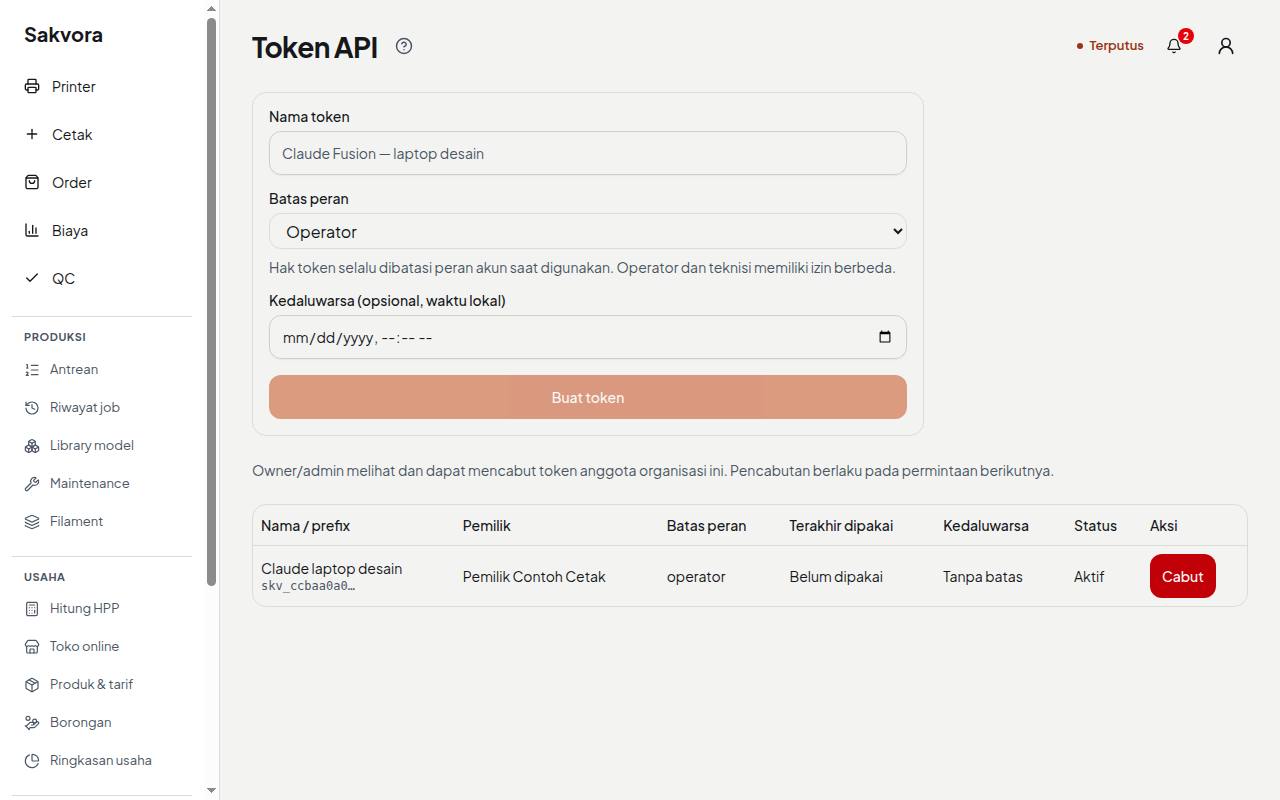
Create a token
- Make sure the right organisation is active, then open API tokens (in the app, Settings).
- Give the token a clear name, such as
Claude design laptop. - Choose a role limit: Viewer (read-only), Operator (design and printing), or your account's role. Set an expiry date if needed.
- Copy the token when it is shown. The full token is shown only once.
Tokens are tied to your account and organisation. If your role is lowered, the token is limited too; if you leave the organisation, it stops working. Owners and admins can view and revoke all members' tokens.
Connect Claude (MCP)
Once the token is created, the API tokens page shows ready-to-copy commands for Mac/Linux and Windows (PowerShell). Paste the right one into a terminal on the computer that runs Claude Code or Claude Desktop. Sakvora tools then appear in your Claude session, such as list_models, hpp_quick, create_product, print, and onboarding_status.
Example commands
Write as if you were giving a task to an operator. The assistant picks the right tools and reports back:
- “Print 5 keyrings on A1 in black, standard quality.” (
list_models,list_printers,slice_plate,hpp_quick,print) - “Which printers are idle, and how much black PLA is left in the AMS?” (
list_printers) - “What are the unit cost and profit on the Regular cigarette case if I sell it for Rp45,000 on Shopee?” (
hpp_quick,product_cost) - “Create an order for Dedi: 2 white Slim Cases, due Friday.” (
create_order) - “What printer alerts have we had today?” (
list_alerts)
Before sending to a printer, the assistant follows the same rules as the app: the printer must be ready and the bed confirmed clear; otherwise the print goes to the queue.
Keep access secure
- Treat tokens like passwords. Don't share them in group chats or keep them in files that get uploaded.
- Revoke tokens you no longer use from the list on the same page.
- Actions involving people and money (inviting members, opening the shop, loading sample data) are deliberately unavailable through tokens.
Tools follow the organisation's features. The SaaS edition includes AI/MCP for production, orders, products, unit costs, and QC; online shop tools are not available. While an organisation is suspended, API/MCP tokens are blocked; viewing and exporting remain available in the app.